Arena Setup Mode & Holograms
The guided /bw setup experience — three setup methods and live holograms that build the arena with you.
BedWars is not only polished for players — the admin experience gets exactly the same treatment. Arena Setup Mode (permission bw.admin, command /bw setup) turns building a ranked-grade arena from a config-file chore into a guided, in-game walkthrough: you pick a setup method, and the plugin builds with you — checks flip from NOT FIXED to FIXED, a live progress percent climbs, and holograms float through the world narrating the next step. Everything on this page comes from a real session on a real arena.
#One menu, three setup methods
Setup opens with a single choice, and the menu makes sure you choose correctly. All three items state their access level in a real hover tooltip before you click, so nobody has to guess what a mode will unlock. One menu, every role covered — from a first-time builder to the plugin developer himself.
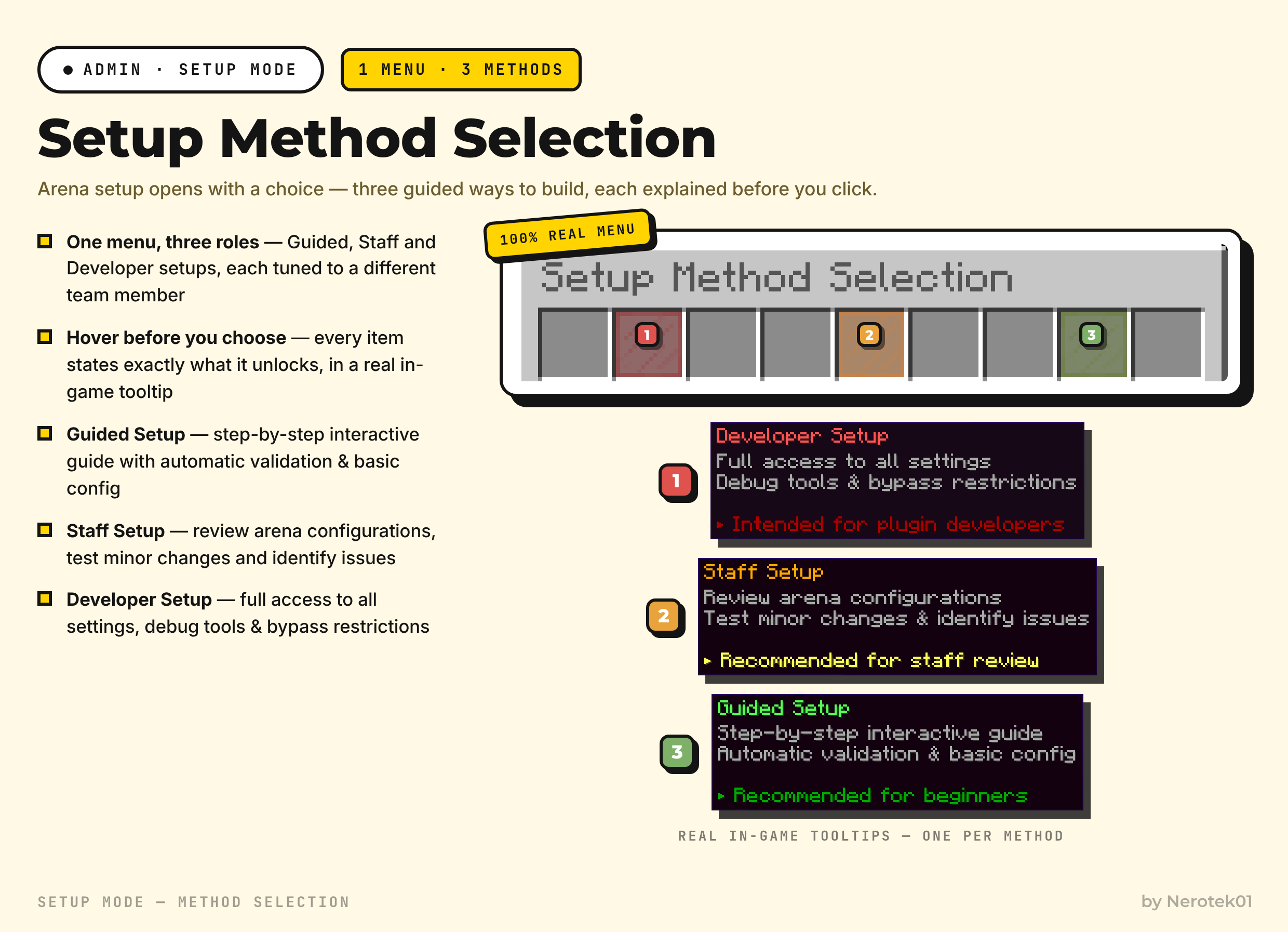
| Method | Who it is for | What it unlocks |
|---|---|---|
| Guided Setup | Beginners and first-time builders | A step-by-step interactive guide with automatic validation and a sane basic config written for you as you go |
| Staff Setup | Review and QA work | Open existing arenas, test minor changes and identify issues — without ever holding full production power |
| Developer Setup | Plugin developers | Full access to all settings, debug tools and bypass restrictions — explicitly labeled as intended for plugin developers |
#Holograms that build with you
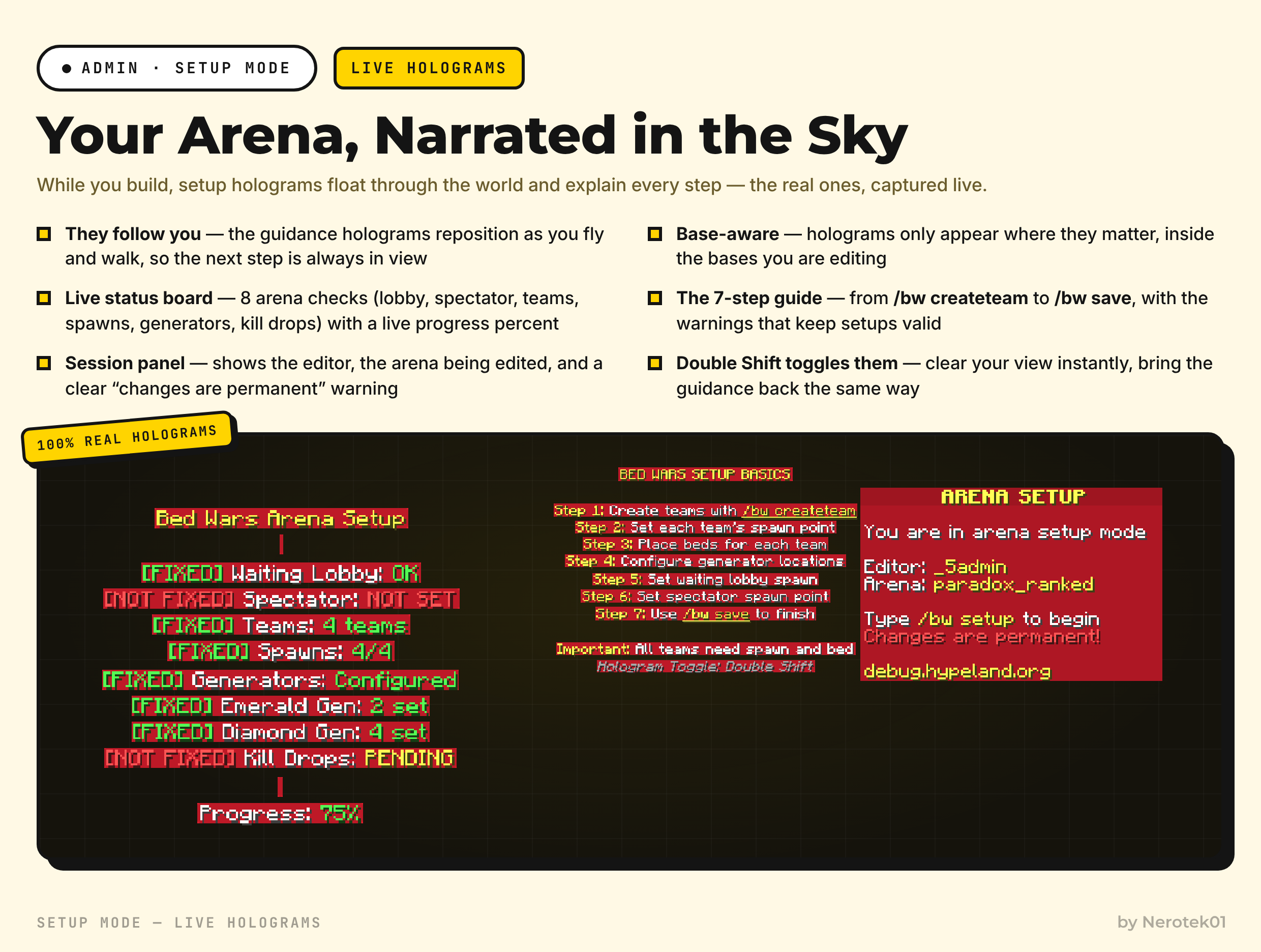
While setup mode is active, three kinds of holograms accompany you through the world, and each one has a precise job:
- The status board — a live checklist of everything a valid arena needs: Waiting Lobby, Spectator spawn, Teams, Spawns, Generators, Emerald Gen, Diamond Gen and Kill Drops. Unfinished items show as struck-through red
[NOT FIXED]entries and flip to green[FIXED]the moment you complete them. Underneath, the overall progress percent updates as you work, so you always know exactly how far the arena is from/bw save. - The step guide — keeps the whole route in front of you: the seven steps from
/bw createteam, through setting each team's spawn point, placing every team's bed, configuring generator locations, setting the waiting-lobby spawn and the spectator spawn point, to the final/bw save. It also carries the two reminders that save the most headaches: all teams need a spawn and a bed, and Double Shift toggles the holograms whenever you want a completely clear view of your build. - The session panel — sits beside you for the entire session and always tells the truth: who is editing, which arena is open, how to begin (
Type /bw setup), and the honest notice that changes are permanent — no silent edits, no surprises later.
#Behavior that ties it together
- The holograms follow you — they reposition as you move through the arena, so the next instruction is always in view instead of being left back at spawn.
- They only display where they matter, inside the bases you are wiring up: walk into a team base and its relevant guidance is there, not a wall of unrelated text.
- Double Shift hides every hologram instantly for a clear view of your build — press it again to bring them back.
Tip:Arena setup stops being documentation-versus-reality debugging and becomes a conversation with the arena itself. When the status board is fully green, finish with /bw save — the arena file is written to Arenas/ and the arena can be enabled immediately.
For the raw command blocks the wizard drives — team creation, spawn and bed placement, generators — see Quick Setup. To try a finished arena before building your own, connect to the Test Server.